YouTube just overtook Spotify as the UK’s most-used podcast platform.
According to Edison Research, 29% of weekly UK podcast listeners now choose YouTube as their main podcast service. Spotify sits just behind at 28%.
It is a narrow lead. The shift is not.
Podcasts are no longer audio-only shows with a camera pointed at the table. They are filmed conversations. Cut-down clips. Shorts. Reels. Thumbnail-led discovery. A full episode might still be listened to on headphones, but the first contact increasingly happens on screen.
Edison’s UK research also found that 72% of weekly UK podcast consumers now watch video podcasts. That makes the studio setup part of the format : not an optional extra.
If you are looking for podcast studio hire in London, start with the five upgrades below. They make the difference between a recording that simply exists and one that is ready to publish across platforms.
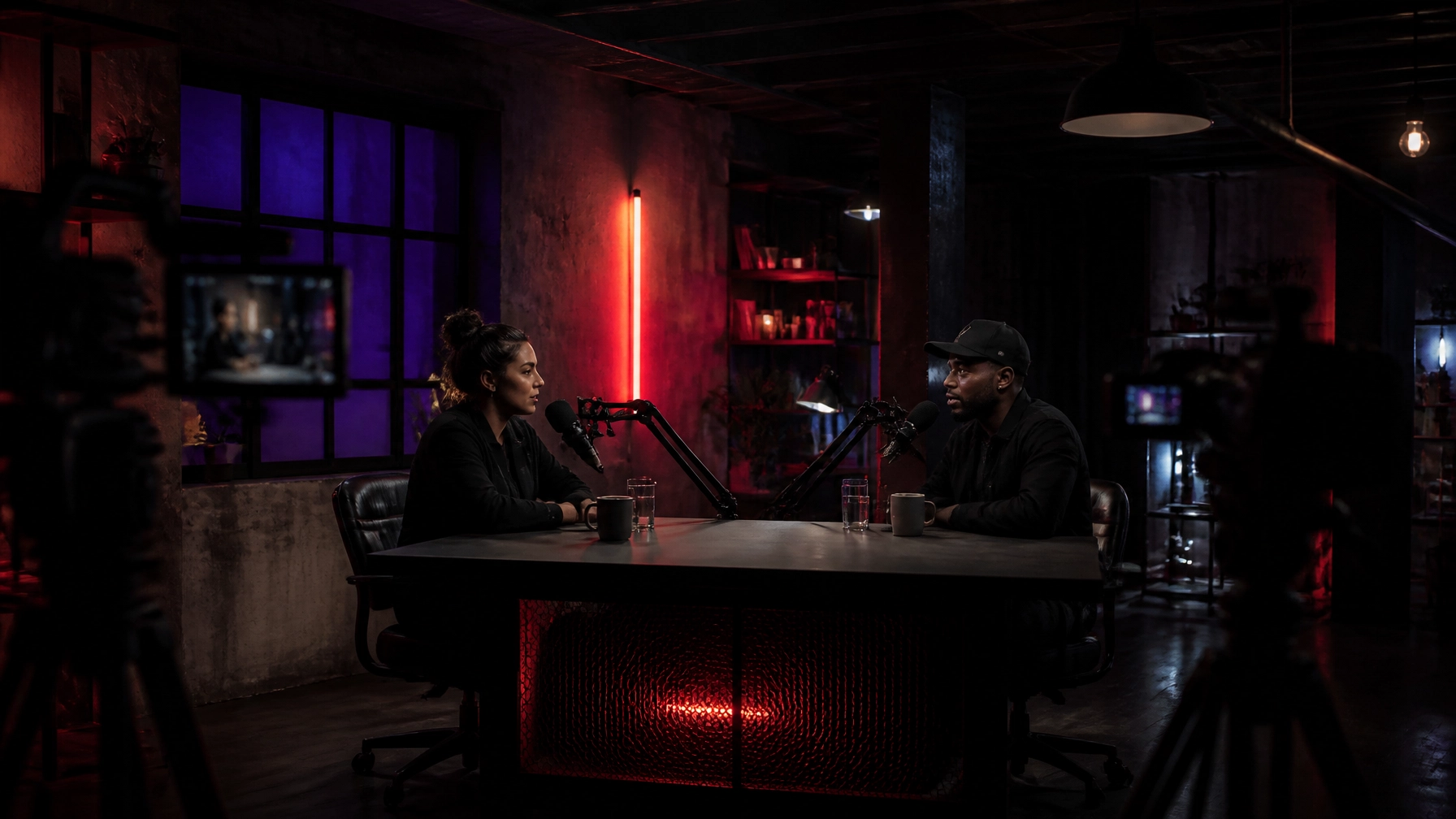
At @38 in Clapton E5, a half-day podcast studio session starts from £175 for up to 4 hours. You get a dedicated room, twin boom-arm microphones, controlled acoustics and a pre-styled visual environment. No set build required.
1. Use broadcast-quality microphones
Good video cannot rescue bad audio.
A viewer might tolerate a simple camera angle. They will not tolerate voices that sound distant, harsh or uneven. If the guest is difficult to hear, they leave before the conversation gets going.
A proper podcast setup starts with the microphones.
Use a dedicated mic for each speaker. Keep the microphones close enough to capture clear speech without forcing guests to lean forward. Mount them on boom arms so the position stays consistent during a long conversation.
The result is more than cleaner sound. It makes the recording easier to edit. Easier to level. Easier to repurpose into clips.
At @38, the podcast room is set up with twin broadcast-quality boom-arm microphones. The arms keep the frame clean while giving each speaker a consistent recording position.
That matters when you are recording:
- Two-person interviews
- Solo podcast episodes
- Brand conversations
- Panel discussions
- Video clips for social platforms
- A full series in one booking
You should be able to focus on the conversation, not whether the mic has moved six inches away from your mouth.

2. Control the lighting before you press record
Lighting changes how professional the whole production feels.
You do not need a wall of cinema fixtures. You do need consistency. Faces should remain visible. Skin tones should not shift from purple to blue between shots. Highlights should not clip whenever someone turns towards the light.
Start with three decisions:
- Where the key light falls
- How much separation the subjects have from the background
- Which colour defines the room
For a video podcast, controlled colour can become part of the show’s identity. A purple-to-red wash gives the frame depth without covering the room in distracting set dressing. It creates a recognisable look that can carry through thumbnails, clips and full episodes.
The lighting should support the conversation. It should not compete with it.
At @38, the podcast room uses adjustable purple and red studio lighting. The dark palette gives the cameras something to shape. The coloured wash creates contrast around the chairs, microphones and background structure.
That gives you a finished visual direction as soon as you arrive.

This is one reason a dedicated video production studio in London can save time. You are not starting with an empty room and a list of lights to hire. You are starting with a look.
3. Choose a backdrop with character
A blank wall is not automatically clean.
On camera, it can look flat. It can make the conversation feel like a remote call. It gives the viewer no sense of place.
A backdrop with texture creates depth without needing a complicated set. Exposed brick. Dark metal. Structural timber. Mesh. Concrete. Strong shadows. These details give the frame something to hold onto.
The important part is restraint. The background should support the speakers, not swallow them.
This is where raw industrial spaces work well for podcasts. The architecture already has visual information. You can create a strong frame without building a fake wall or bringing in multiple flats, props and branded panels.
At @38, the podcast room includes two Wassily chairs, dark structural elements and atmospheric lighting. The space is styled before the booking starts.
No set build required.

A characterful backdrop also gives you more options during one session. Use the main two-person setup for the full episode. Move to a tighter angle for short-form clips. Capture a few stills against the industrial surfaces for promotion.
One room. More than one output.
For more on the shift from audio-only recording, read 72% of UK Podcast Listeners Watch Video Now.
4. Treat acoustics as part of the picture
Acoustics are invisible on screen. They are obvious in the edit.
Hard walls and empty rooms create reflections. Those reflections make voices sound boxy, distant or metallic. You can try to fix some of that afterwards, but the cleaner solution is to record in a room designed for controlled sound.
Good acoustics help you capture:
- Clearer speech
- Less room echo
- More consistent levels
- Cleaner pauses
- Fewer distractions during editing
This is particularly important for long-form interviews. A one-hour conversation contains hundreds of cuts, breaths and changes in speaker position. If the room tone is inconsistent, every edit becomes more noticeable.
At @38, the podcast room has controlled acoustics and is independent from the main floor. That means the recording setup is separate from the rest of the venue.
You can keep the room focused on the conversation. No competing event setup. No other clients moving through the frame. Full exclusivity during your session.
That is the practical difference between recording in a room that happens to be available and booking a room built for the job.
5. Build a multi-camera frame
One locked-off camera can document a conversation.
Multiple cameras can edit it.
A basic multi-camera setup usually gives you:
- A wide shot of both speakers
- A dedicated angle for the host
- A dedicated angle for the guest
- Flexible close-ups for clips
- Cleaner edits between questions and answers
- More visual movement without interrupting the conversation
The key is consistency. Match the cameras as closely as possible. Keep exposure and colour temperature aligned. Check eyelines before the recording starts. Leave enough space around the frame for captions and platform crops.
YouTube may be the main destination, but the same recording needs to work vertically for Shorts, Reels and TikTok. Shoot with those formats in mind. A face too close to the edge of a horizontal frame may disappear when cropped to 9:16.
A multi-camera plan also helps the edit feel natural. Cut to the listener when the guest speaks. Use the wide shot to reset the pace. Hold on a close-up when the point matters.
The viewer may not notice the camera changes consciously. They will notice if the episode feels static.
At @38, the room gives you a controlled starting point for interviews and media production. Bring your camera team, use the available space efficiently and plan your angles before the guests arrive.

The right setup makes the recording easier
You do not need to overbuild a video podcast.
You need the fundamentals in the right order:
- Clear voices
- Controlled light
- A backdrop with character
- Reliable acoustics
- Enough camera coverage to edit properly
That is the value of booking a dedicated podcast studio. The technical decisions are already closer to solved. You can spend the session on the guest, the questions and the recording.
At @38, Podcast Studio hire starts from £175 for up to 4 hours. Full-day sessions are £300 for up to 8 hours, giving you enough time to record multiple episodes, interviews and short-form content in one booking.
Clapton · Hackney · London E5.
You can view the Podcast Studio setup, book a half-day session, or enquire directly at at38.org. We respond within 24 hours.
Which upgrade would make the biggest difference to your podcast : microphones, lighting, backdrop, acoustics or multi-camera framing?
Comment below. Then DM @38 or book your session at at38.org.
Leave a Reply